
When working with Copilot Studio and Power Platform, there comes a point when a question arises that isn’t just technical, it’s architectural:
Should I implement this with Agent Flows or with Power Automate?
I recently found myself in this exact situation while designing an agent in Copilot Studio, and what was interesting is that the difference wasn’t in the development itself… but in how you think about the system.
But before I tell you the story, let’s lay the cards on the table.
In pure development terms, they’re almost identical:
- Same visual designer
- Same connectors (including premium ones)
- Same expressions and logic (conditions, loops, variables, scopes, etc.)
- Same experience for a maker (well… let’s admit Microsoft has been giving Copilot a bit more love lately 😅)
If you know how to build a cloud flow in Power Automate, you know how to build an Agent Flow. However, from an architectural perspective, the decision isn’t that simple, let’s look at the main differences between the two:
The real differences (architecture and execution)
| Difference | Power Automate | Agent Flows |
|---|---|---|
| Execution context | System / Events | Conversational / IA |
| Triggers | Wide range | From the agent or conversational events |
| Licensing | Based on Power Automate licenses and connectors | Based on Copilot Studio (credits/capacity) |
| Reuse and collaboration | Full | Limited(no co-owners/run only users) |
Execution Context
The most important difference is not technical, it’s conceptual.
Power Automate is designed to automate system processes: SharePoint events, incoming emails, scheduled runs, integrations between applications. The flow lives independently of any conversation.
Agent Flows, on the other hand, run within the context of an agent in Copilot Studio. They are part of the reasoning and orchestration of actions that the agent performs during an interaction with the user.
Architecturally, this means:
Agent Flows→ Automation embedded in the conversational experience
Power Aytomate→ Decoupled automation
Triggers
Power Automate offers a broad catalog of triggers:
- When an item is created (SharePoint)
- When an email arrives (Outlook)
- Recurrence
- HTTP Request
- Dataverse
- Power Apps
- A Copilot Studio agent
- (…)
It’s a platform oriented toward events within the Microsoft ecosystem and beyond.
With Agent Flows, the primary trigger is the agent itself. The flow runs when the agent invokes it as a tool within a conversation or as part of its decision logic.
This doesn’t fundamentally change the nature of the design, since the main goal of this post is to choose between Power Automate and Agent Flows when working with Copilot Studio and both can be triggered by an agent.
Licensing
Here lies one of the most relevant aspects for real-world decisions.
In Power Automate, the use of premium connectors (such as Dataverse or HTTP) requires Premium licensing.
With Agent Flows, consumption is charged against the Copilot Studio capacity model. According to Microsoft’s official documentation (as of February 2026), actions executed by an Agent Flow consume Copilot Studio capacity, specifically 13 Copilot Credits per 100 actions. Of course, if the user interacting with the agent has a Microsoft 365 Copilot license, no consumption is incurred.
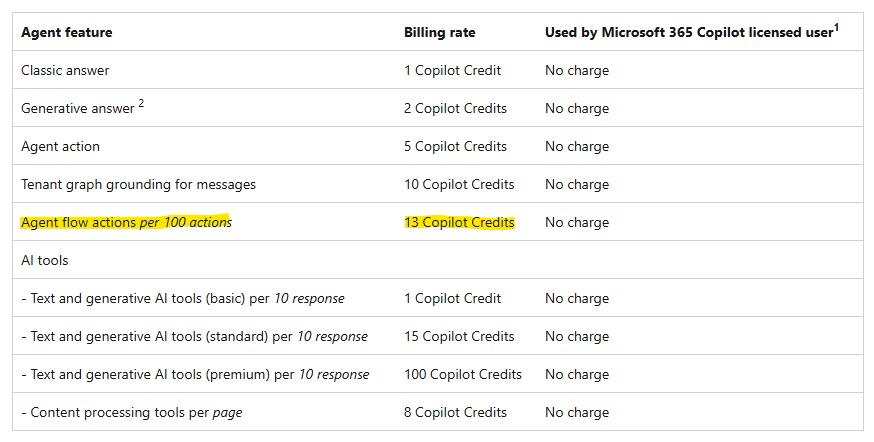
This implies that:
- Power Automate has a structured, fixed cost based on licenses.
- Agent Flows have a variable cost depending on how the agent is used.
So, if we assume we are always operating in a conversational scenario with Copilot Studio…
Which decision would optimize the overall cost of the solution?
| If the answer to this question is yes… | Then the recommendation is… | Why |
|---|---|---|
| Do the users consuming the agent have a Microsoft 365 Copilot license? | Agent Flow | Copilot Credit consumption will be 0. |
| Is the flow very complex (many actions, loops, multiple prompts)? | Power Automate | Power Automate offers a fixed and predictable cost. Copilot Credit consumption could increase significantly. |
| Is the volume moderate and the flow relatively simple (few actions)? | Agent Flow | You avoid introducing new licenses and maximize existing investment. |
| Do you want to leverage Copilot credits or already contracted capacity? | Agent Flow | You avoid adding new licenses and make the most of your existing capacity. |
Reuse and collaboration
Power Automate allows co-ownership, run-only permissions, and sharing flows or templates…
Agent Flows do not support sharing, co-owners, or run-only permissions in the same way Power Automate flows do. This means that the user who initiates the conversation will always be the one executing each action within the flow.
Now that we have a high-level view of the main differences, let’s continue with the story…
The context: the agent had to “do things,” not just respond
The initial design of the process (at a high level) looked something like this:
- The user provides a questionnaire (file or text)
- The agent extracts the questions and understands the context
- It searches historical records (previous answers in documentation)
- It proposes a response
- If found, it provides supporting evidence
- It goes through human validation
- It generates a final document with traceability
Up to this point, everything seemed like “just an agent.” But once you start getting into the details, you realize that a real agent needs to execute actions: read and write to repositories, call APIs, create documents, update statuses…
In the Power Platform world, that sounds like: Power Automate.
My first intuition: “this smells like Power Automate Premium.”
My first reaction was the usual one:
- If I touch Dataverse, it’s probably Premium.
- If I use HTTP or custom connectors, Premium.
And of course, once the flow moves into Premium territory, it’s no longer just “implement it and move on”, there’s an impact on licensing, adoption, and TCO.
So I decided not to assume anything and started asking more concrete questions.
Investigation 1: What changes if I build it with Agent Flows?
Here came the first turning point: Agent Flows (in Copilot Studio) feel like Power Automate… because they practically are. Same designer, same actions, same logic, same expressions. So far, nothing unusual.
As we’ve seen throughout this post, the real difference wasn’t in how it’s built, but in where it lives, who executes it, and how much it’s going to cost me.
Investigation 2: Can an Agent Flow use premium actions?
The next question was straightforward, because if the answer had been “no,” the discussion would have ended there and we would have gone back to Power Automate with its usual licensing model.
What’s interesting is that you can execute premium actions within an Agent Flow, and the consumption is accounted for as Copilot Studio Credits. In other words, the licensing burden shifts to Copilot Studio, and Microsoft includes the premium actions available in Power Automate under that capacity model.
Investigation 3: What does executing an Agent Flow actually consume?
As we’ve seen in this post, the practical conclusion is this: there is no fixed cost for executing an Agent Flow. What truly drives cost is the number of actions the flow runs, specifically, 13 Copilot Credits per 100 actions.
Therefore, if the final decision is to use an Agent Flow, it becomes critical to optimize it and avoid unnecessary actions.
Investigation 4: What if users already have Microsoft 365 Copilot?
This probably should have been my first question, because if the answer had been that all end users would have a license, it wouldn’t have made much sense to keep overthinking it.
The key learning here was that users with a Microsoft 365 Copilot license do not consume Copilot Credits when executing an Agent Flow, since it’s already included.
That led me to a final reflection: in many organizations, capacity is already planned or even underutilized. In those cases, it makes sense to leverage it before introducing additional licensing through Power Automate Premium.
The final decision (and why I made it)
In the end, the decision felt quite natural: keep the automation inside the agent using Agent Flows.
The main reason was twofold:
- Cost / Licensing: At this stage, we avoided adding Power Automate Premium licenses by relying on already available capacity (Copilot Credits), since we didn’t expect the agent’s consumption to represent a disproportionate share of the total capacity.
- Experience consistency: If the process is conversational, it makes sense for the orchestration to live inside the agent. It keeps the architecture coherent and reduces friction.
If you’re at this design stage and struggling with the same question, I’d love to hear your take: are you building a conversational agent that executes actions, or an automation that just happens to have a chat interface in front of it?


 🚀Power Tower
Leave a comment